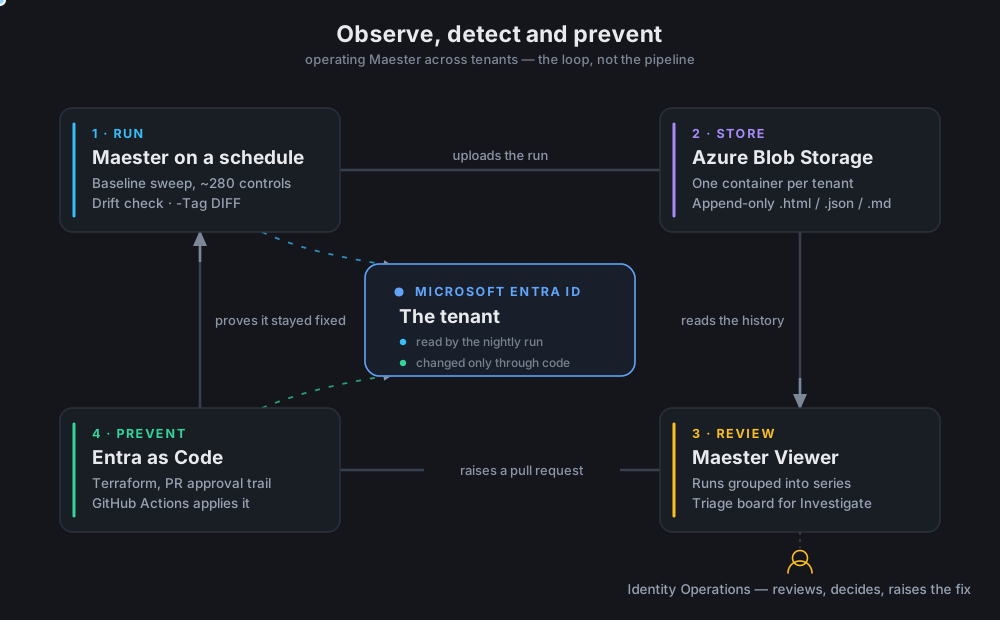
Maester is an amazing tool. Point it at an Entra ID tenant. A few minutes later you have one self-contained HTML report. It tells you which of about 280 security controls hold and which do not: CIS, CISA/SCuBA, EIDSCA, ORCA, plus any custom Pester test you write yourself.
Run it once and it is excellent.
Run it every night, across several tenants, and you learn something else. A report is not the same thing as a practice. After a few months you have a blob container with hundreds of files, three per run:
.html— easy for a human to read,.json— easy to process programmatically,.md— easy to attach to a triage record.
Three questions come up in every governance review, and a folder of reports answers none of them:
Is this tenant getting better or worse?Each report is one point in time. To compare two you open two 4 MB HTML files side by side and squint.Did anyone act on last week's findings?Maester marks some testsInvestigate: it could not decide, so a human has to look. That is a to-do list with nowhere to record that the to-do got done.Which runs are even comparable?A drift check is eight tests. A baseline sweep is 280. Both land in the same folder, sorted by timestamp, and a “pass rate over time” chart that mixes them is noise.
These are not tooling questions. They are the ordinary questions the owner of a tenant has to answer. So we built an operating layer on top, in three stages:
- observe the posture over time,
- detect what changed,
- prevent it from coming back.
It does not replace the Maester report — that stays exactly as it is, one click away.
💡Note: First, how to extend Maester with your own tests. Second, what to build on top of the results.
Extending Maester: write your own test
Maester runs on Pester, so a custom test is a normal Pester file named *.Tests.ps1, placed in a Custom folder next to the built-in tests. Here is a real one, checking that no application secret is expired or about to expire:
Describe "MJ.CTS" -Tag "CTS.1003", "MJ", "Assessment" {
    BeforeAll {
        . $PSScriptRoot/Modules/Test-MtApplicationSecretExpiry.ps1
    }

    It "CTS.1003: Application secrets should not be expired or expiring soon" {
        $result = Test-MtApplicationSecretExpiry

        if ($null -ne $result) {
            $result | Should -Be $true -Because "expired secrets cause application outages."
        }
    }
}
The if ($null -ne $result) guard is not noise. $null means “this test could not run at all”, and asserting on it would turn a missing connection into a failed control.
The logic lives in a separate function so it can be reused and unit tested. Inside it, three Maester helpers do the work a plain Pester test cannot:
# 1. Do not fail when we are simply not connected.
if (-not (Test-MtConnection Graph)) {
    Add-MtTestResultDetail -SkippedBecause NotConnectedGraph
    return $null
}

# 2. Put a readable explanation in the report, as Markdown.
Add-MtTestResultDetail -Result $markdownTable `
    -Description "Application secrets should not expire within 30 days."

# 3. Hand the decision to a human when the tool cannot make it.
Add-MtTestResultDetail -TestInvestigate `
    -Result "Two report-only policies overlap; confirm which one applies."
That third one matters later. -TestInvestigate is how a test says “I found something, but a person has to judge it.”
Run your own tests, all of them or one area by tag:
Invoke-Maester -Path ./Custom -DisableTelemetry -OutputFolder ./test-results
Invoke-Maester -Path ./Custom -Tag "Applications" -OutputFolder ./test-results
Tag on purpose. Tags are how you select tests later and, as you will see below, how a whole run gets grouped. Give a Describe block a tag that names the family of checks, and put a stable id in the It name.
Severity is configuration, not code. A test can carry a Severity:High tag, but Custom/maester-config.json can set severity per test id, and the config file wins. So you can lower the severity of a control you have consciously accepted without editing anybody’s test.
That is extension inside Maester. Now the part that happens after the run.
The loop, not the pipeline
Run on a schedule, upload to Azure Blob Storage (one container per tenant), then review. The third step is the one most setups skip, and it is the one that feeds back into the first: reviewing produces a decision, and a decision that is not written down did not happen.
Here is a single run in the viewer:
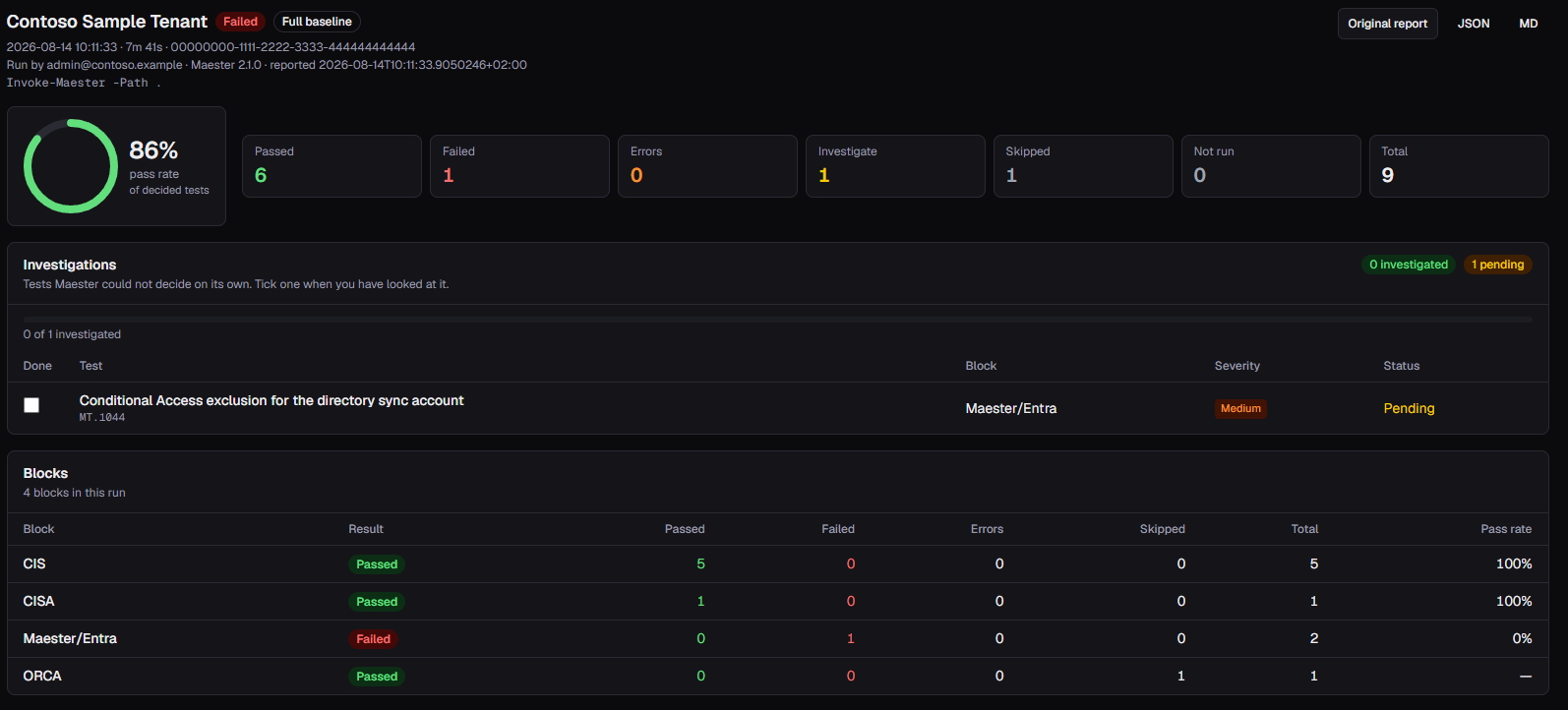
Everything on that screen answers a review question instead of describing a file: which series the run belongs to (Full baseline), who ran it, and the result per framework block. “86%” is a number nobody can act on. “The Maester/Entra block is at 0%” is.
The pass rate is calculated over decided tests only. Skipped and not-run tests are excluded from the denominator instead of quietly counting as passes. That is the difference between a posture number and a flattering one. The undecided tests do not disappear either — they become the work queue below.
Observe — is this tenant getting better or worse?
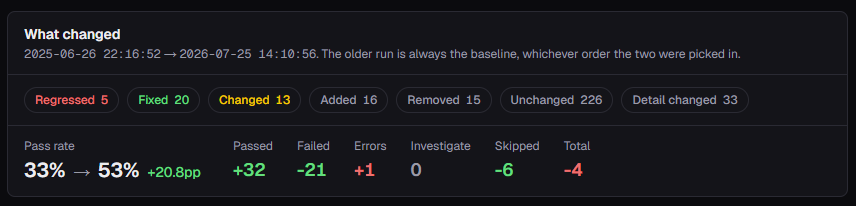
A single report tells you what is true tonight. Posture is a trend, and a trend needs measurements of the same thing.
Runs are comparable only if they ran the same tests
A drift check and a baseline sweep are different kinds of run, and the storage container does not know that. Sorted by timestamp they interleave, and a pass-rate chart drawn over the mix is worse than no chart at all.
So runs are grouped into series: baseline, drift, custom, and whatever else you invent. Every trend is drawn per series.
The nice part is where the series comes from. Nobody has to tag anything by hand, and no naming convention has to be enforced on whoever schedules the runs. Maester 2.x already writes the resolved Pester configuration into the run JSON:
"PesterConfig": {
  "Run":    { "Path": ["./Custom"] },
  "Filter": { "Tag": ["DIFF"] }
}
That is a record of ‘what was run’, which is exactly what we want to group by. Better still, PesterConfig sits before Tests in the JSON, so the small ranged read the run list already does contains it — no extra download.
So grouping works on every run already in storage. No change to the runner, no re-upload, no migration, nothing new for an operator to remember. Instead of one line jumping between an 8-test drift run and a 280-test sweep, you get one sparkline per series, and “we improved this quarter” becomes a claim you can show instead of assert.
If you want to override that, or you still have Maester 1.x runs that record no PesterConfig, stamp suite = <id> as blob metadata at upload time. Runs already in storage can be placed the same way, without re-running anything.
One trap worth naming
The drift tests live inside the ./Custom folder. So a drift run and a custom run have the same -Path, and only -Tag DIFF separates them.
Get the match order wrong and every drift run quietly merges into “custom checks”. There is no error anywhere, and the chart still looks fine. A wrong grouping is worse than no grouping.
One container per tenant
Multi-tenant is the normal case for anyone running this as a service, and the boundary is the storage container: one per tenant, named with the tenant GUID. Access is granted per container. “Who can see this tenant’s posture” becomes an RBAC question with an auditable answer, not a filter inside an application.
Detect — what changed, and what is new versus recurring
Trends tell you the direction. Operations needs the delta.
Drift, as a scheduled question
Next to the nightly baseline there is a drift check. Export the directory twice with EntraExporter, compare the two JSON trees, and fail on any difference.
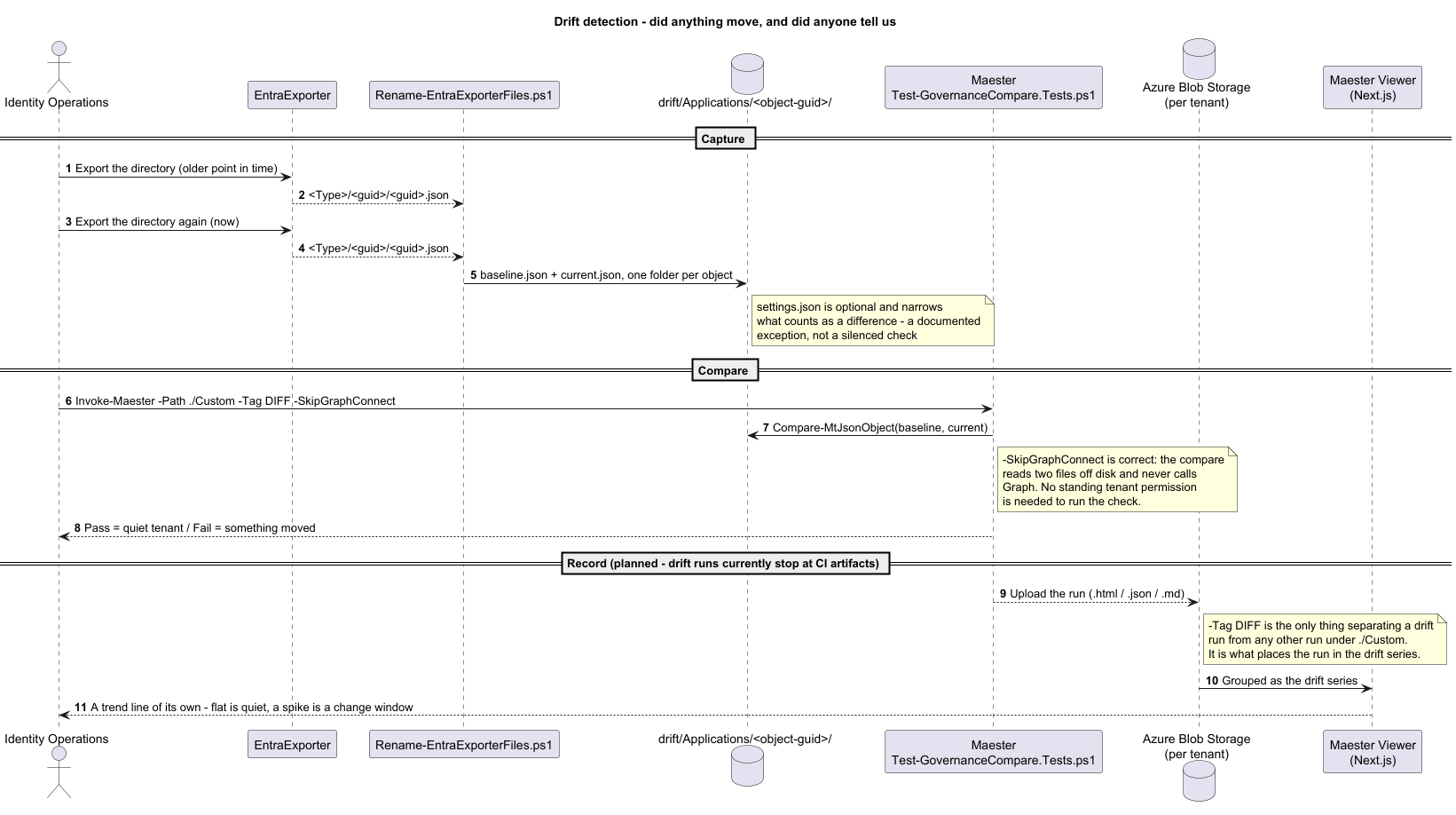
This is also a custom Maester test, and a good example of how far you can push one. It uses Pester’s BeforeDiscovery to build the test list from the folder structure, so you define new drift checks by creating folders, not by writing code:
Simplified, to show the shape:
BeforeDiscovery {
    $driftFolders = Get-ChildItem -Path $driftRoot -Directory
}

Describe "MJ.CTS.Governance" -ForEach $driftFolders {
    It "MT1060.<_.Name>.4: Drift all values in '<_.Name>' match" `
        -Tag "DIFF", "MT1060", "MT1060.$($_.Name)" {
        $issues = Compare-MtJsonObject -Baseline $baselineData `
                                       -Current  $currentData `
                                       -Settings $settingsObject
        $issues.Count | Should -Be 0
    }
}
That is assertion .4 of four. In the real test, BeforeAll loads both files and runs the comparison once per folder, and the result is split across .1 baseline is valid JSON, .2 current is valid JSON, .3 no property went missing, .4 no value changed. Compare-MtJsonObject ships with Maester 2.x.
Invoke-Maester -Path ./Custom -Tag DIFF `
  -SkipGraphConnect -DisableTelemetry -OutputFolder ./test-results
It answers a different question from the baseline sweep. Not “are we compliant” but “did anything move, and did anyone tell us”. As its own series it gets its own trend line: a flat line is a quiet tenant, a spike is a change window you either knew about or did not.
Two flags in that command are really governance decisions.
The comparison needs no permissions.
-SkipGraphConnectworks because it reads two exported files from disk and never calls Graph. The check that tells you the tenant moved does not itself need standing access to the tenant.
A known deviation is documented, not silenced. Each compared object can carry a
settings.jsonthat narrows what counts as a difference — the fields you have consciously accepted as varying. That is an exception register next to the evidence, which is a very different thing from commenting out a failing test.
Investigate is a work queue the tool cannot close
Maester marks a test Investigate when it cannot decide: the policy exists but two report-only rules overlap, or an exclusion looks deliberate and somebody should confirm it. It is a real work queue, and it is stateless. Every run regenerates it from scratch, so last week’s judgement calls come back looking identical to tonight’s new ones.
So each Investigate test becomes a tickable work item:
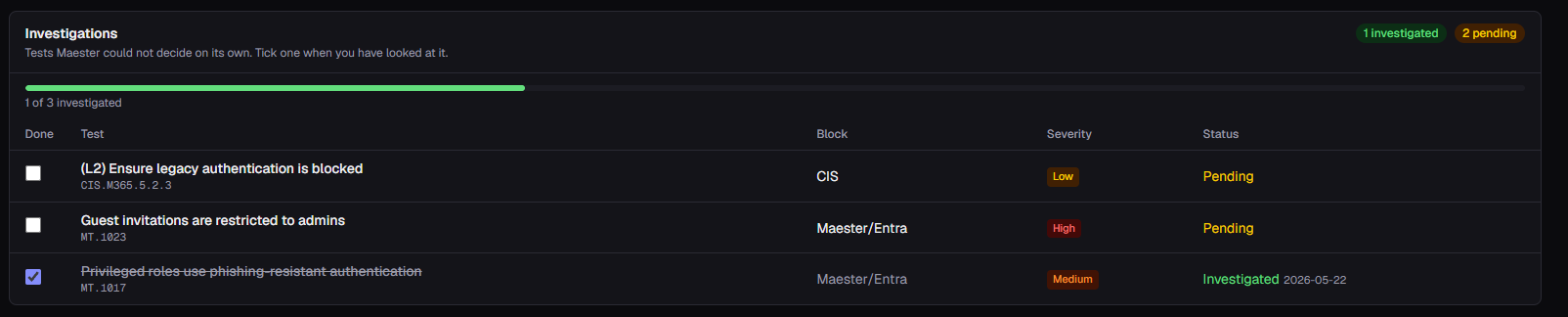
That turns “some tests need a human” into something a review meeting can run on. One of three looked at, dated and struck through. Two still open, with severity attached so you know which to take first. Next month, “we reviewed that” has a record behind it instead of a memory.
The state lives in a small file next to the run it belongs to. The ticked MT.1017 above is this entry:
{
  "version": 1,
  "run": "TestResults-2026-05-21-170322",
  "tasks": { "MT.1017": { "status": "completed", "updatedAt": "…" } }
}
Only completed items are stored. No entry means pending, so a run nobody touched and a run with no file at all behave identically. There is no initialisation step, no “create the task list” action for someone to forget, and no way for the list to drift out of sync with the tests it describes. The run JSON itself is never modified — the original artifacts stay untouched, which is the whole reason they are worth keeping as evidence.
Be honest about the cost. Recording decisions makes the tool read-write, which the original design ruled out. It needs Storage Blob Data Contributor instead of Reader, and anyone who can reach the app can tick items. If your evidence chain requires an untouchable audit trail, turn triage off and keep the decisions somewhere that has approvals.
Prevent — closing the loop
Most assessment tooling stops at observe and detect. That is why the same finding comes back quarter after quarter. Prevention is not a feature of a viewer — it is what you do with the output.
A finding fixed by hand comes back. The durable fix is to move the control into code and let the audit prove it stayed there: identities and policy provisioned through Terraform with a PR-based approval trail, then continuously audited by the same Maester tests that found the gap. That is the loop described in Governance Entra ID with Backstage and Maester, and the pipeline shape is in Entra ID Four Musketeers.
The drift series is the enforcement signal. Once a control is in code, any change to it outside the pipeline is drift by definition. The interesting metric stops being the pass rate and becomes the number of changes that reached the tenant without a pull request.
The tooling is in scope too. An assessment platform holds a complete description of every tenant’s weaknesses, so it is a target in its own right. RBAC data-plane roles, no SAS tokens. The Maester HTML is third-party content, so it is always rendered in an iframe with sandbox="allow-scripts" and never with allow-same-origin next to it — together the two defeat the sandbox. And the run JSON is sensitive: it carries the runner’s UPN, the tenant name and the tenant’s full security posture, so keep the app behind Entra ID authentication or on localhost.
Where this is today
Run list, run detail, series grouping, comparison, test history and investigation tracking are implemented and in use. The drift check works, but its CI workflow still runs without -Tag DIFF and uploads to GitHub artifacts instead of the storage account, so those runs never reach the viewer. Both are one-line pipeline fixes, and a good illustration of the point above: the grouping is only as good as the invocation.
Summary
- Maester is extensible by design. A custom test is a normal Pester file plus a few helpers:
Add-MtTestResultDetailfor readable output,-SkippedBecausefor an honest skip,-TestInvestigateto hand a decision to a human. - Tags and paths are metadata, not decoration. They select which tests run, and afterwards they are what lets you group the runs.
- Use the metadata that is already there. Maester has been recording its own invocation in every output file since version 2.0. The process change you do not have to roll out is the one that actually happens.
- A report is not a workflow. It tells you what is true, not what changed or what anyone decided about it. That needs somewhere to live, and it does not have to be big. Store it to analyze later.
- Prevent, or you will read the same finding next quarter. Move the control into code with a PR trail, let the same Maester tests prove it stayed there, and count the changes that reached the tenant without a pull request.
Links and connected resources:
- Maester: https://maester.dev
- Pester: https://pester.dev
- EntraExporter: https://github.com/microsoft/EntraExporter
- My post about governing Entra ID with Backstage and Maester: https://mjendza.net/post/governance-entra-id-backstage-maester/
- My post about running Maester, EntraExporter and ZeroTrustAssessment from GitHub Actions: https://mjendza.net/post/entra-musketeers/