Changelog
- 2025-11-17 initial version
- 2026-01-02 updated Zero Trust Assessment pipeline to publish only HTML files (all others are not needed to display the report)
TL;DR
- Maester: Review your tenant configuration using Pester (PowerShell) tests written by the community or customised by you.
- EntraExporter: Export tenant state to JSON files. Review changes between exports and take action.
- ZeroTrustAssessment: Evaluates tenant posture against Zero Trust baseline. Provides the big picture and summary of findings.
- Together they enable repeatable change management, drift detection, and continuous improvement.
Introduction
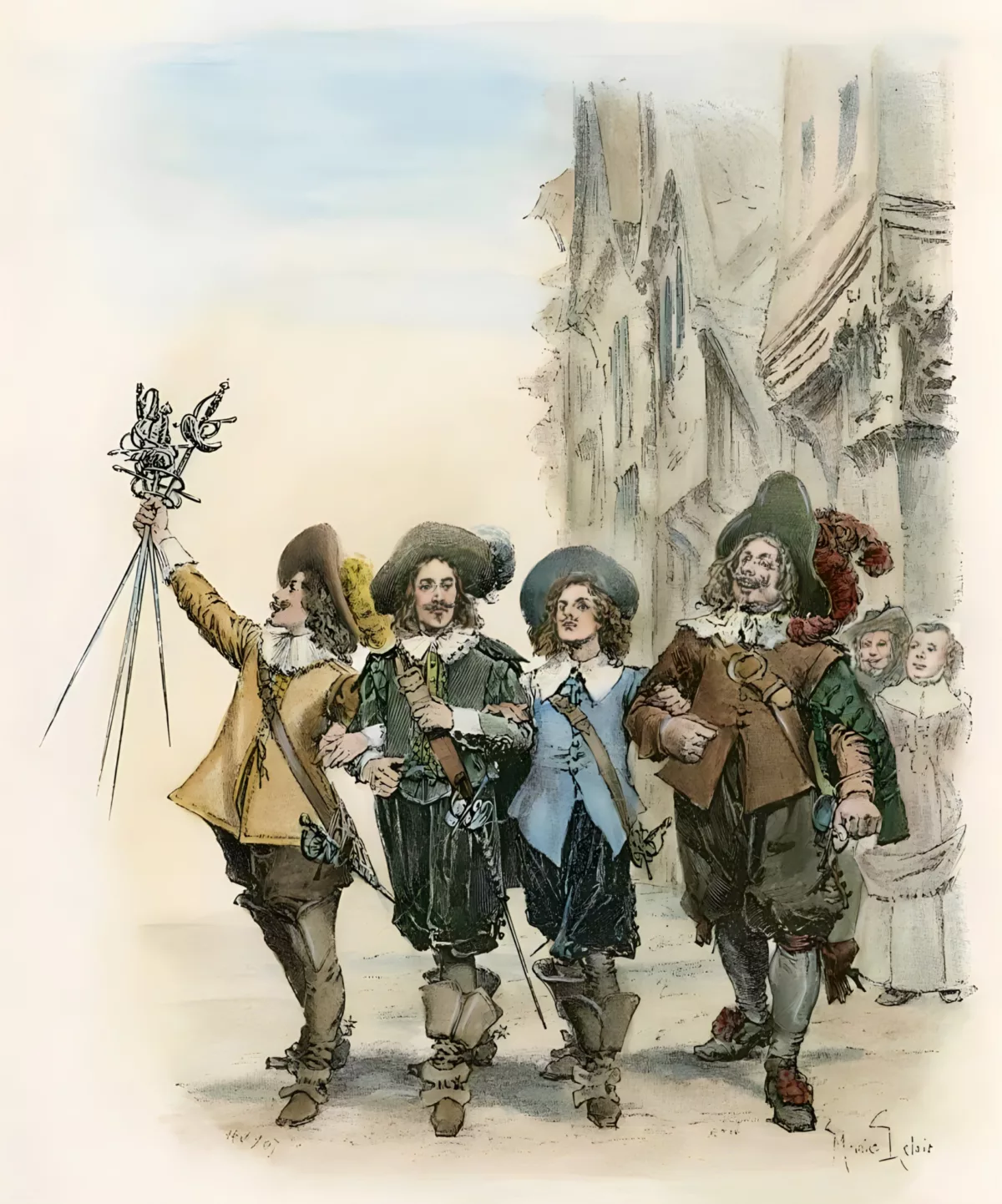
Operating Entra ID at scale requires more than ad-hoc scripting. Configuration must be observable, assessable, repeatable, and improvable. Rather than building custom verification scripts, backup solutions, or assessment frameworks from scratch, leverage three proven tools from Microsoft and the community—collectively known as the Entra ID Three Musketeers: Maester, EntraExporter, and ZeroTrustAssessment. Each addresses a critical piece of the operational lifecycle—governance testing, configuration export, and security assessment—forming a complete loop for identity platform maturity.
These tools are battle-tested, actively maintained, and designed specifically for Entra ID operations, eliminating the need to build custom solutions from scratch.
Big Picture
Think of the lifecycle:
- Observe current state (EntraExporter).
- Assess against policy and Zero Trust benchmarks (ZeroTrustAssessment).
- Test your Entra ID configuration (Maester).
This loop reduces configuration drift, surfaces misalignment early, and embeds security posture reviews inside the delivery pipeline rather than after it.
This continuous assessment can be implemented using build agents in Azure DevOps or GitHub Actions, running pipelines daily, weekly, or monthly, depending on your organisation’s maturity.
Publishing the assessment results in a dedicated place makes it easy to review and act on the findings. Comparing two runs, whether manual or automated, provides a better understanding of the state of Entra ID.
Maester
- PowerShell module for both Windows and Linux runtimes
- Outputs reports in HTML, JSON, or Markdown formats
- Extensible with custom tests
- Supports Service Principal and User Authentication
- Large community and regular updates—1.3.0 is the latest stable release https://github.com/maester365/maester/releases/tag/1.3.0, but in prerelease mode there are many changes https://github.com/maester365/maester/releases/tag/1.3.115-preview
Entra Exporter
- PowerShell module compatible with Windows and Linux
- Exports tenant state to JSON files
- Supports Service Principal and User Authentication
Zero Trust Assessment
- PowerShell Module (Windows & Visual C++ Redistributable)
- Output as HTML report & db file & JSON files
- Service Principal and User Authentication
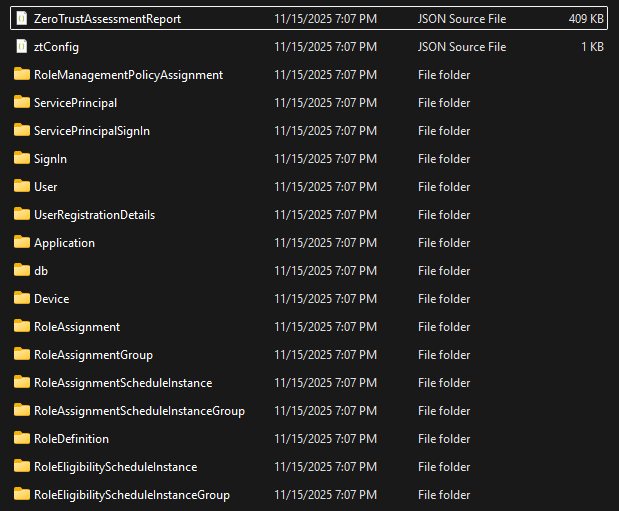
ZTA root
zta-rexportdirectory
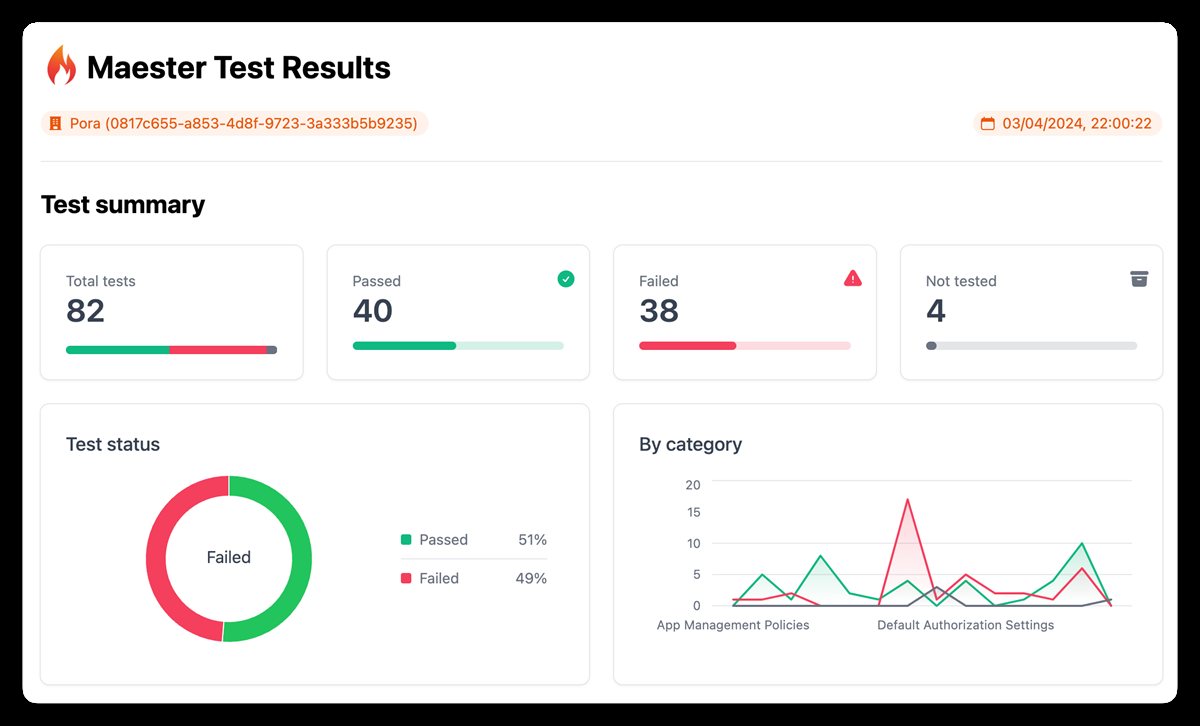
Maester report overview

Review results
Maester report overview
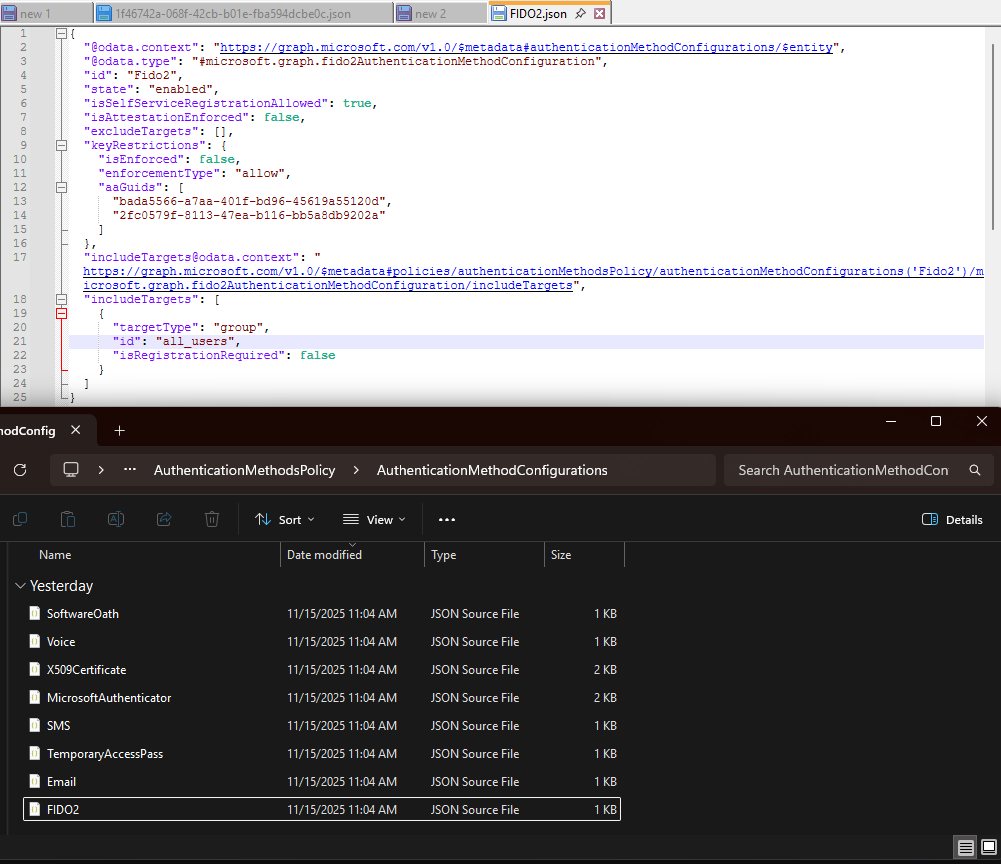
Entra Exporter example JSON and folder structure (each configuration peer Authentication Method is a separate JSON file)
ZeroTrustAssessment demo: https://microsoft.github.io/zerotrustassessment/demo/
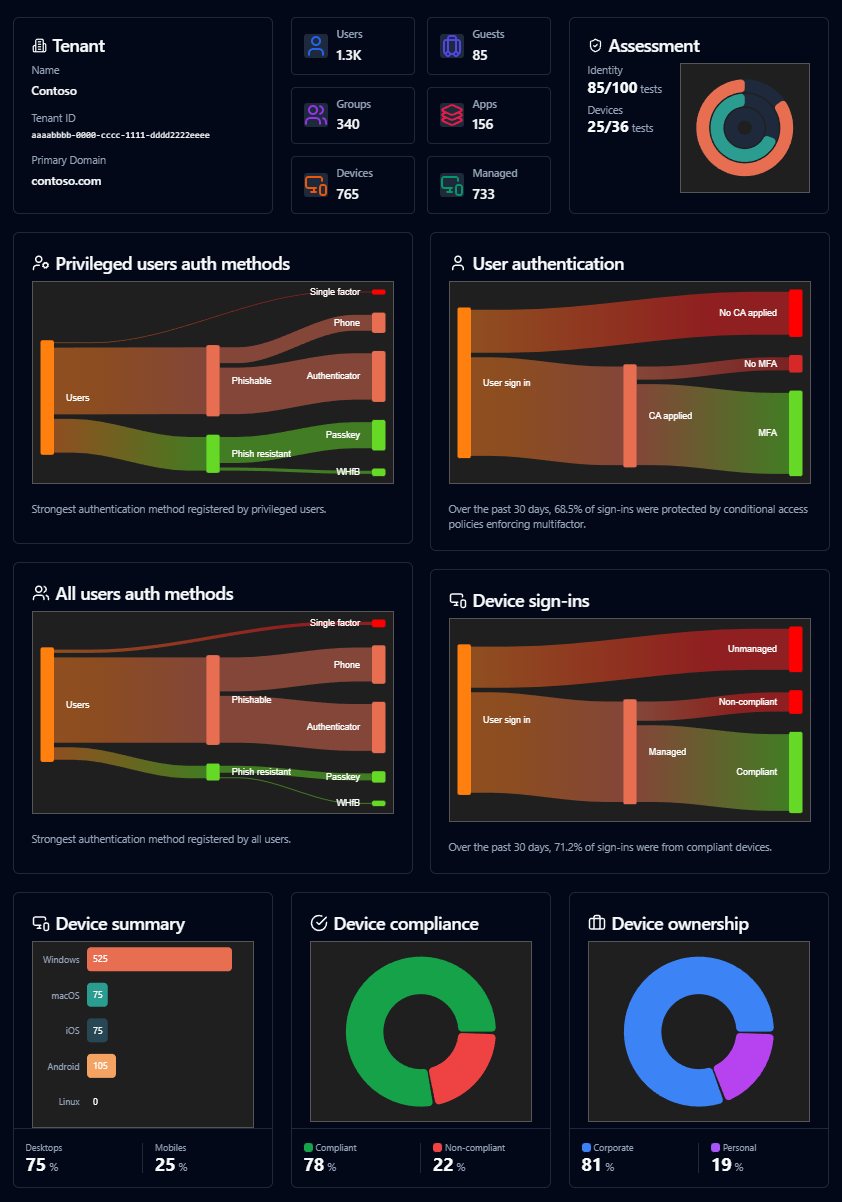
The Three Tools as Github Actions
Maester
Baseline
- Import ready-to-use GitHub Action step
maester365/maester-action@main. - Pipeline based on the Maester documentation.
- Should be extended to include your custom tests.
- Export Report (HTML, JSON, MD) to Build Artefacts.
- Show summary with total files and size.
name: Run Maester 🔥
on:
  # push:
  #   branches:
  #     - main

  # schedule:
  #   # Daily at 7:30 UTC, change accordingly
  #   - cron: "30 7 * * *"

  # Allows to run this workflow manually from the Actions tab
  workflow_dispatch:

jobs:
  test:
    runs-on: ubuntu-latest
    environment: maester-workforce-tenant
    permissions:
      id-token: write
      contents: read

    steps:
      - name: Run Maester 🔥
        id: maester
        # Set the action version to a specific version, to keep using that exact version.
        uses: maester365/maester-action@main
        with:
          tenant_id: ${{ vars.AZURE_TENANT_ID }}
          client_id: ${{ vars.AZURE_CLIENT_ID }}
          include_public_tests: true
          include_private_tests: false

          include_exchange: false
          include_teams: false
          # Set a specific version of the powershell module here or 'latest' or 'preview'
          # check out https://www.powershellgallery.com/packages/Maester/
          maester_version: latest
          disable_telemetry: true
          step_summary: true

      - name: Write status 📃
        shell: bash
        run: |
          echo "The result of the test run is: ${{ steps.maester.outputs.result }}"
          echo "Total tests: ${{ steps.maester.outputs.tests_total }}"
          echo "Passed tests: ${{ steps.maester.outputs.tests_passed }}"
          echo "Failed tests: ${{ steps.maester.outputs.tests_failed }}"
          echo "Skipped tests: ${{ steps.maester.outputs.tests_skipped }}"
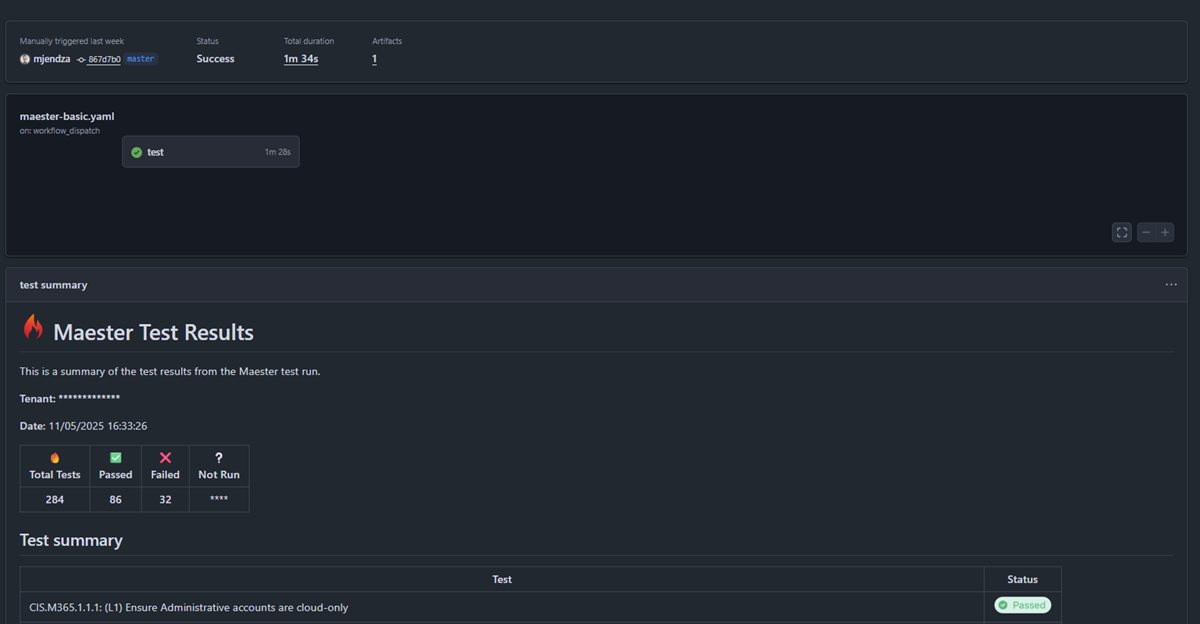
Example screen from pipeline run:
Entra Exporter
Baseline
- Simple pipeline based on the EntraExporter documentation.
- Export Config, Applications, ServicePrincipals as a start point (my code).
- Export Configuration (Folders & Json’s) to Build Artefacts.
- Show summary with total files and size.
Code
name: Run EntraExporter 🚀
on:
  push:
    branches:
      - master

  # schedule:
  #   # Daily at 7:30 UTC, change accordingly
  #   - cron: "30 7 * * *"

  # Allows to run this workflow manually from the Actions tab
  workflow_dispatch:

jobs:
  export:
    runs-on: ubuntu-latest
    environment: entra-exporter-workforce-tenant
    permissions:
      id-token: write
      contents: read

    steps:
      - name: Checkout repository
        uses: actions/checkout@v4

      - name: Install PowerShell 7
        uses: actions/setup-dotnet@v4
        with:
          dotnet-version: '8.0.x'

      - name: Install PowerShell Modules
        shell: pwsh
        run: |
          Install-Module -Name Az -Scope CurrentUser -Force -AllowClobber
          Install-Module -Name Microsoft.Graph -Scope CurrentUser -Force -AllowClobber
          Install-Module -Name Microsoft.Entra -Scope CurrentUser -Force -AllowClobber
          Install-Module -Name EntraExporter -Scope CurrentUser -Force -AllowClobber
      - name: Log in to Azure using OIDC
        uses: azure/login@v2
        with:
          client-id: ${{ vars.AZURE_CLIENT_ID }}
          tenant-id: ${{ vars.AZURE_TENANT_ID }}
          allow-no-subscriptions: true
          enable-AzPSSession: true

      - name: Run EntraExporter Export 📦
        shell: pwsh
        run: |
          $token = (Get-AzAccessToken -ResourceTypeName MSGraph -AsSecureString -ErrorAction Stop).token
          $null = Connect-Entra -AccessToken $token -ErrorAction Stop
          Write-Host "Starting Entra export..."
          # Create output directory
          $outputPath = "${{ github.workspace }}/entra-export"
          #(Get-Command Export-Entra | Select-Object -Expand Parameters)['Type'].Attributes.ValidValues
          #https://github.com/microsoft/EntraExporter?tab=readme-ov-file#export-options
          New-Item -ItemType Directory -Force -Path $outputPath

          # Run EntraExporter
          Export-Entra -Path $outputPath -Type "Config", "Applications", "ServicePrincipals"
          Write-Host "Export completed successfully!"

          # List exported files
          Get-ChildItem -Path $outputPath -Recurse

      - name: Upload Export Artifacts 📤
        uses: actions/upload-artifact@v4
        with:
          name: entra-export-${{ github.run_number }}
          path: ${{ github.workspace }}/entra-export
          retention-days: 30

      - name: Export Summary 📊
        shell: pwsh
        run: |
          $exportPath = "${{ github.workspace }}/entra-export"
          $fileCount = (Get-ChildItem -Path $exportPath -Recurse -File).Count
          $totalSize = (Get-ChildItem -Path $exportPath -Recurse -File | Measure-Object -Property Length -Sum).Sum
          $sizeInMB = [math]::Round($totalSize / 1MB, 2)

          Write-Host "Export Summary:"
          Write-Host "- Total files exported: $fileCount"
          Write-Host "- Total size: $sizeInMB MB"
          Write-Host "- Artifact name: entra-export-${{ github.run_number }}"

          # Add to GitHub step summary
          @"
          ## EntraExporter Summary 🚀

          - **Total files exported:** $fileCount
          - **Total size:** $sizeInMB MB
          - **Artifact name:** entra-export-${{ github.run_number }}
          - **Retention:** 30 days
          "@ | Out-File -FilePath $env:GITHUB_STEP_SUMMARY -Append
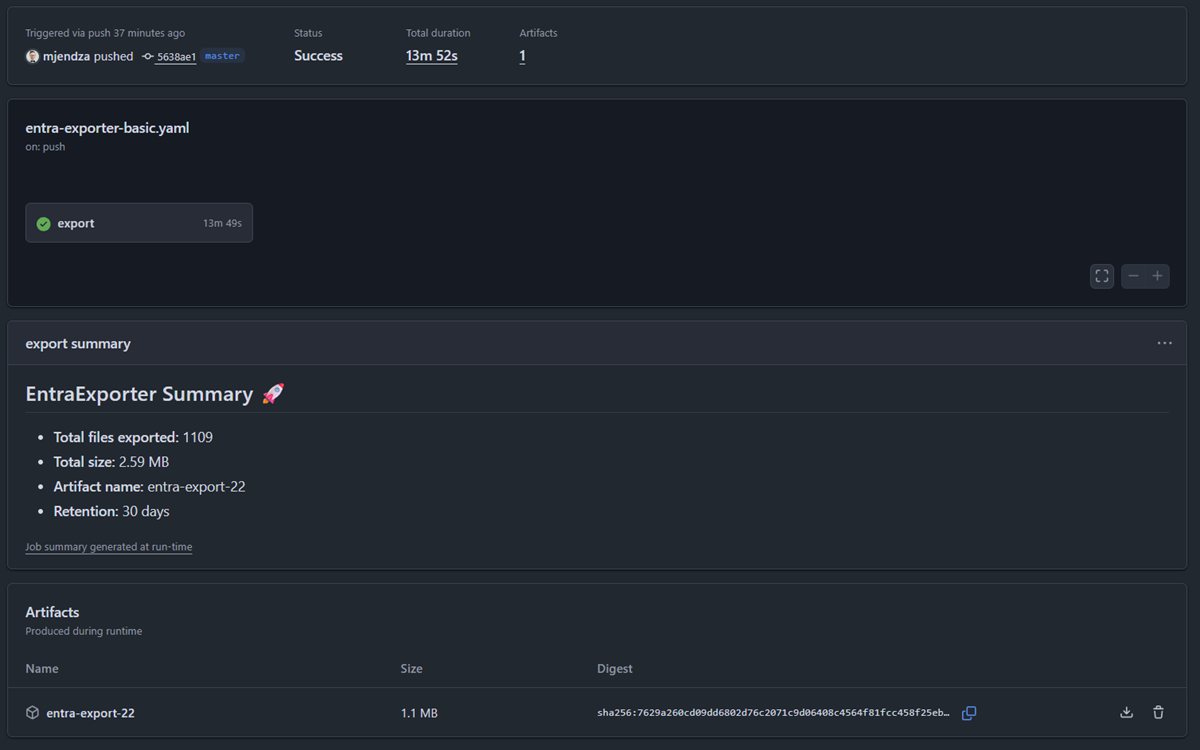
Example screen from pipeline run:
Zero Trust Assessment
Baseline
- Simple pipeline based on the Zero Trust Assessment documentation.
- The PowerShell module requires Visual C++ Redistributable to be installed on the build agent - the agent should be windows-latest.
- Like other pipelines, the pipeline will use Workload Federated Identity to authenticate to Entra ID.
- Export Report (HTML) to Build Artefacts.
- Export only HTML file - the ‘zt-export’ folder is not needed.
- Show summary with total files and size.
Code
name: Run Microsoft Zero Trust Assessment 🛡️
on:
  push:
    branches:
      - master

  # schedule:
  #   # Daily at 7:30 UTC, change accordingly
  #   - cron: "30 7 * * *"

  # Allows to run this workflow manually from the Actions tab
  workflow_dispatch:

jobs:
  export:
    runs-on: windows-latest
    environment: microsoft-zta-mjendza
    permissions:
      id-token: write
      contents: read

    steps:
      - name: Checkout repository
        uses: actions/checkout@v4

      - name: Install PowerShell 7
        uses: actions/setup-dotnet@v4
        with:
          dotnet-version: '8.0.x'

      - name: Install Visual C++ Redistributable
        shell: pwsh
        run: |
          Write-Host "Downloading Visual C++ Redistributable..."
          $vcRedistUrl = "https://aka.ms/vs/17/release/vc_redist.x64.exe"
          $vcRedistPath =  "vc_redist.x64.exe"

          Invoke-WebRequest -Uri $vcRedistUrl -OutFile $vcRedistPath -UseBasicParsing

          Write-Host "Installing Visual C++ Redistributable..."
          Start-Process -FilePath $vcRedistPath -ArgumentList '/install', '/quiet', '/norestart' -Wait -NoNewWindow

          Write-Host "Visual C++ Redistributable installed successfully!"
          Remove-Item -Path $vcRedistPath -Force -ErrorAction SilentlyContinue

      - name: Install PowerShell Modules
        shell: pwsh
        run: |
          Install-Module -Name ZeroTrustAssessment -Scope CurrentUser -Force -AllowClobber
          Install-Module -Name Az -Scope CurrentUser -Force -AllowClobber

      - name: Log in to Azure using OIDC
        uses: azure/login@v2
        with:
          client-id: ${{ vars.AZURE_CLIENT_ID }}
          tenant-id: ${{ vars.AZURE_TENANT_ID }}
          allow-no-subscriptions: true
          enable-AzPSSession: true

      - name: Run ZtAssessment 📦
        shell: pwsh
        run: |
          $token = (Get-AzAccessToken -ResourceTypeName MSGraph -AsSecureString -ErrorAction Stop).token
          $outputPath = "${{ github.workspace }}/entra-zta"
          # Connect to Microsoft Graph with the access token
          Connect-MgGraph -AccessToken $token -ErrorAction Stop
          Invoke-ZtAssessment -Path $outputPath -ErrorAction Stop


          Write-Host "ZtAssessment completed successfully!"

          # List exported files
          Get-ChildItem -Path $outputPath -Recurse

      - name: Upload ZtAssessment Artifacts 📤
        uses: actions/upload-artifact@v4
        with:
          name: entra-zta-${{ github.run_number }}
          path: ${{ github.workspace }}/entra-zta/**/*.html
          retention-days: 30

      - name: ZtAssessment Summary 📊
        shell: pwsh
        run: |
          $exportPath = "${{ github.workspace }}/entra-zta"
          $fileCount = (Get-ChildItem -Path $exportPath -Recurse -File).Count
          $totalSize = (Get-ChildItem -Path $exportPath -Recurse -File | Measure-Object -Property Length -Sum).Sum
          $sizeInMB = [math]::Round($totalSize / 1MB, 2)

          Write-Host "ZtAssessment Summary:"
          Write-Host "- Total files exported: $fileCount"
          Write-Host "- Total size: $sizeInMB MB"
          Write-Host "- Artifact name: entra-zta-${{ github.run_number }}"

          # Add to GitHub step summary
          @"
          ## ZtAssessment Summary 🚀

          - **Total files exported:** $fileCount
          - **Total size:** $sizeInMB MB
          - **Artifact name:** entra-zta-${{ github.run_number }}
          - **Retention:** 30 days
          "@ | Out-File -FilePath $env:GITHUB_STEP_SUMMARY -Append
Extra! Terraform for Workload Federated Identity
The Terraform AzureAD provider can be used to create a dedicated Service Principal for the workload. Based on the Zero Trust Assessment requirements for Microsoft Graph API permissions from the page: https://learn.microsoft.com/en-us/security/zero-trust/assessment/get-started#connect-to-microsoft-graph-and-microsoft-azure We have a list:
AuditLog.Read.All
CrossTenantInformation.ReadBasic.All
DeviceManagementApps.Read.All
DeviceManagementConfiguration.Read.All
DeviceManagementManagedDevices.Read.All
DeviceManagementRBAC.Read.All
DeviceManagementServiceConfig.Read.All
Directory.Read.All
DirectoryRecommendations.Read.All
EntitlementManagement.Read.All
IdentityRiskEvent.Read.All
IdentityRiskyUser.Read.All
Policy.Read.All
Policy.Read.ConditionalAccess
Policy.Read.PermissionGrant
PrivilegedAccess.Read.AzureAD
Reports.Read.All
RoleManagement.Read.All
UserAuthenticationMethod.Read.All
Copying the list into the https://permissions.factorlabs.pl, we can get the corresponding Graph API permission IDs:
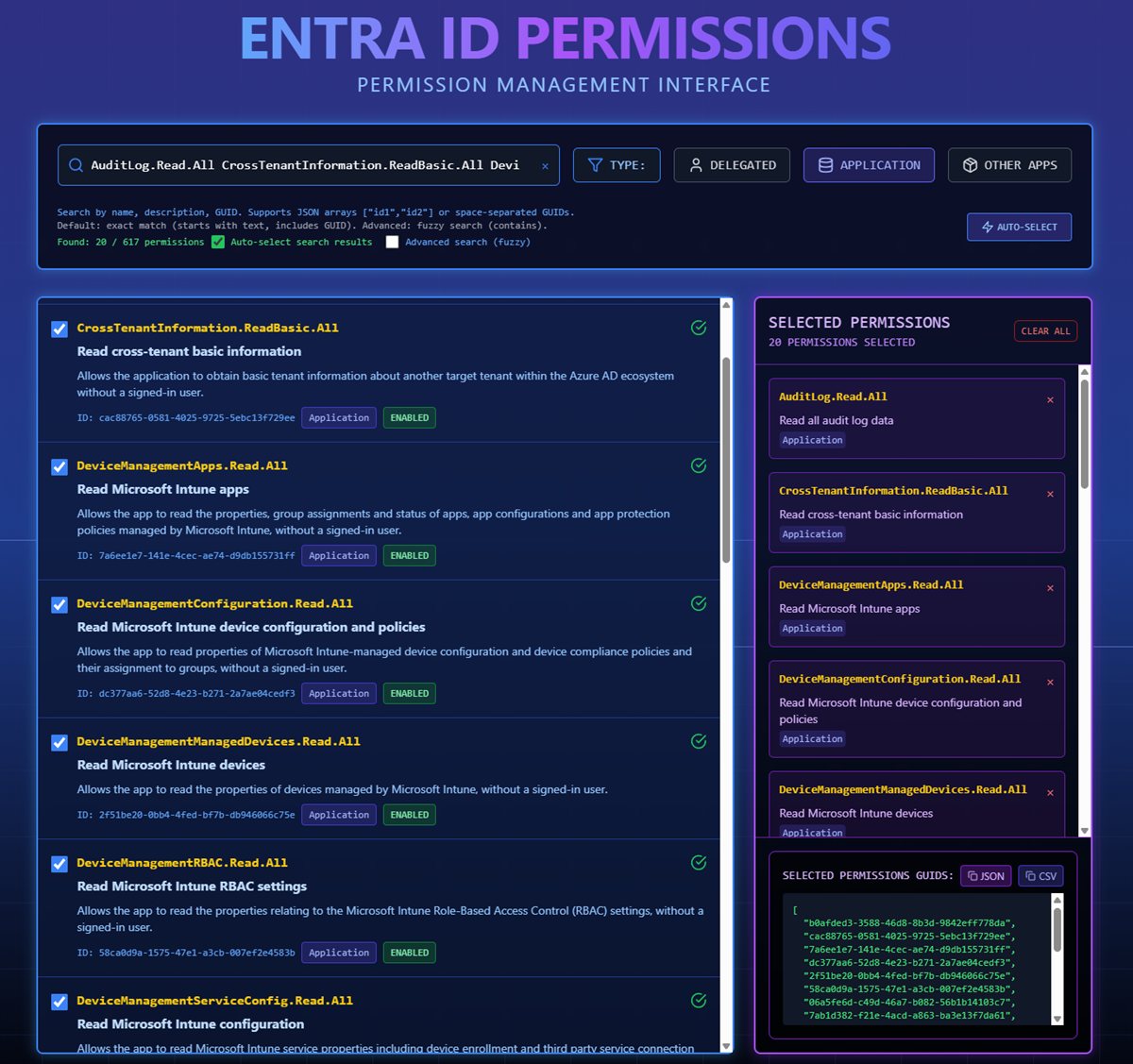
We will use very similar code for all our resources, each with its own dedicated permissions:
module "MicrosoftZTA_ServicePrincipal" {
  source = "./modules/service_principal_workload_identity"
  business_name = "MicrosoftZTA"
  enable_workload_identity = true
  subject_identifier = "repo:mjendza/sandbox-terraform-entra-id:environment:microsoft-zta-workforce-tenant"
  issuer_url = "https://token.actions.githubusercontent.com"
  graph_permissions = [
    "b0afded3-3588-46d8-8b3d-9842eff778da",
    "cac88765-0581-4025-9725-5ebc13f729ee",
    "7a6ee1e7-141e-4cec-ae74-d9db155731ff",
    "dc377aa6-52d8-4e23-b271-2a7ae04cedf3",
    "2f51be20-0bb4-4fed-bf7b-db946066c75e",
    "58ca0d9a-1575-47e1-a3cb-007ef2e4583b",
    "06a5fe6d-c49d-46a7-b082-56b1b14103c7",
    "7ab1d382-f21e-4acd-a863-ba3e13f7da61",
    "ae73097b-cb2a-4447-b064-5d80f6093921",
    "c74fd47d-ed3c-45c3-9a9e-b8676de685d2",
    "6e472fd1-ad78-48da-a0f0-97ab2c6b769e",
    "dc5007c0-2d7d-4c42-879c-2dab87571379",
    "246dd0d5-5bd0-4def-940b-0421030a5b68",
    "37730810-e9ba-4e46-b07e-8ca78d182097",
    "9e640839-a198-48fb-8b9a-013fd6f6cbcd",
    "4cdc2547-9148-4295-8d11-be0db1391d6b",
    "01e37dc9-c035-40bd-b438-b2879c4870a6",
    "230c1aed-a721-4c5d-9cb4-a90514e508ef",
    "c7fbd983-d9aa-4fa7-84b8-17382c103bc4",
    "38d9df27-64da-44fd-b7c5-a6fbac20248f"
  ]
}
Basic Module for Service Principal
variable "graph_permissions" {
    description = "List of Graph API permissions"
    type        = list(string)
    default     = []
}
variable "business_name" {
    description = "Business name"
    type        = string
}
variable "enable_workload_identity" {
    description = "Enable workload identity federation"
    type        = bool
}
variable "subject_identifier" {
    description = "Subject identifier for the federated credential"
    type        = string
}
variable "issuer_url" {
    description = "Issuer URL for the federated credential"
    type        = string
}

resource "azuread_application" "this" {
  display_name     = "TF.${var.business_name}.ServicePrincipal"
  sign_in_audience = "AzureADMyOrg"
  api {
    mapped_claims_enabled          = true
    requested_access_token_version = 2
  }
  feature_tags {
    enterprise = true
    gallery    = false
  }
  dynamic "required_resource_access" {
    for_each = length(var.graph_permissions) > 0 ? [1] : []
    content {
      # Microsoft Graph
      resource_app_id = "00000003-0000-0000-c000-000000000000"

      dynamic "resource_access" {
        for_each = var.graph_permissions
        content {
          id   = resource_access.value
          type = "Role"
        }
      }
    }
  }
}

resource "azuread_service_principal" "this" {
  client_id                    = azuread_application.this.client_id
  app_role_assignment_required = false
}

resource "azuread_application_federated_identity_credential" "this" {
  count              = var.enable_workload_identity ? 1 : 0
  application_id     = azuread_application.this.id
  display_name       = "${var.business_name}-federated-credential"
  description        = "Workload Identity Federation for ${var.business_name}"
  audiences          = ["api://AzureADTokenExchange"]
  issuer             = "${var.issuer_url}"
  subject            = var.subject_identifier
}

output "application_id" {
  value = azuread_application.this.id
}

output "application_client_id" {
  value = azuread_application.this.client_id
}

output "service_principal_id" {
  value = azuread_service_principal.this.id
}
Summary
- Secure workflows with GitHub Actions and Workload Federated Identity, eliminating the need for secrets.
- Maintain a clear, versioned history of your configuration with artefacts.
- Quick and straightforward initial setup.
- Seamless adoption of new tools using the Terraform AzureAD provider and Factorlabs Entra ID Permissions website for efficient Graph API permission mapping.
What next?
- Compare two Entra Exports via Maester diff: https://github.com/maester365/maester/pull/995
Links
- Backstage foundation post: https://mjendza.net/post/backstage-for-entra-operations
- Entra ID docs: https://learn.microsoft.com/entra/
- Terraform provider (reference): https://registry.terraform.io/providers/hashicorp/azuread/latest
- Zero Trust guidance: https://learn.microsoft.com/en-us/security/zero-trust/assessment/overview
- Maester: https://maester.dev/
- EntraExporter: https://github.com/microsoft/EntraExporter
- Entra ID Permissions (Factorlabs): https://permissions.factorlabs.pl