It has been nearly two years since my initial exploration of Entra External ID for Customers - Native Authentication back in June 2024. Since then, the authentication landscape has evolved, and Microsoft has continued to enhance the capabilities of Entra External ID.
In this update:
- Native Authentication has been extended to support Multi-Factor Authentication (MFA).
- One-Time Passwords (OTP) via email and SMS have been enabled as additional authentication methods.
I am still keeping my fingers crossed for magic link authentication and passkey support!
Key Takeaways for the Native Authentication API:
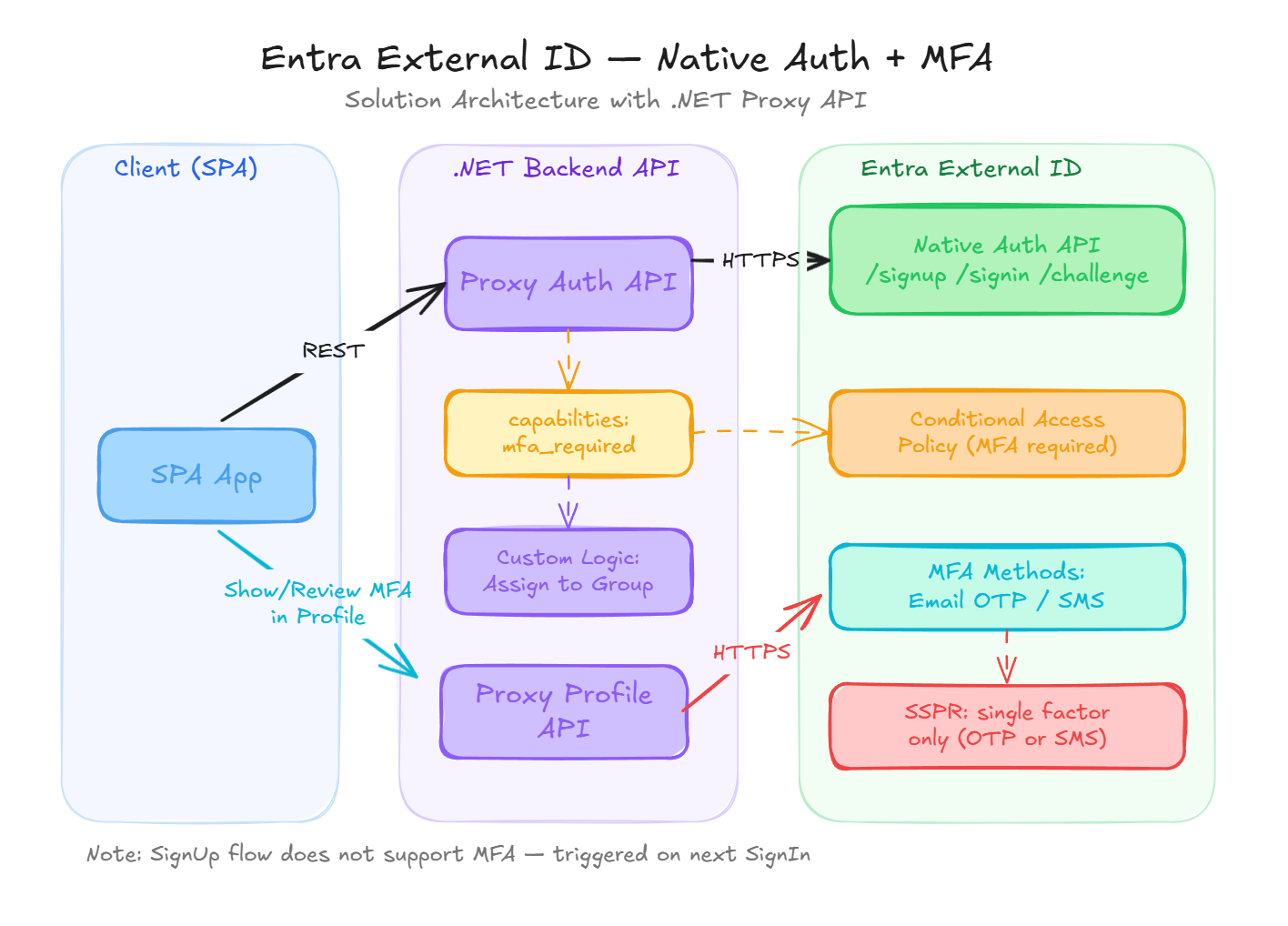
- To trigger the MFA flow, I needed to update the initial API request by including the
capabilitiesparameter with the valuesmfa_requiredandregistration_required. - The initial Sign-Up flow does not support MFA (similar to Entra ID Workforce) not even triggered via token endpoint as a part of Sign-Up (Sign-Up is a combined part of the Sign-In process). However, users are forced to register for MFA during first Sign-In attempt.
- MFA is triggered via Conditional Access policies. Since the application is registered as a public client, the MFA challenge can be enforced based on required API scopes or user/group assignments. There is currently no way to configure the API call to force MFA as a direct part of the Native Authentication flow.
My solution architecture remains largely the same: a .NET REST API acting as a proxy to the Entra External ID Native Authentication API (as opposed to using Azure Front Door to expose a CORS-enabled API directly to the SPA). A dedicated backend API provides the significant benefit of allowing custom logic—in my case, automatically assigning users to a specific group with an attached Conditional Access policy during the Sign-Up flow.
Self-Service Password Reset (SSPR) and MFA
When email OTP is selected as the MFA method, the Self-Service Password Reset (SSPR) workflow will only require the OTP (the emailed code) to authorize a password reset. The same behavior applies to SMS-based MFA. This deviates somewhat from traditional SSPR flows, which typically demand multiple verification methods. I hope this aspect of security will be enhanced in the future to ensure a more robust verification process for password resets.

How can we address this limitation? In my implementation, I designed a custom SSPR flow within the backend API that requires users to verify their identity using both an OTP code and an additional verification method (e.g., a security code). This ensures the password reset process is substantially more secure and less susceptible to unauthorized access.
See it in Action
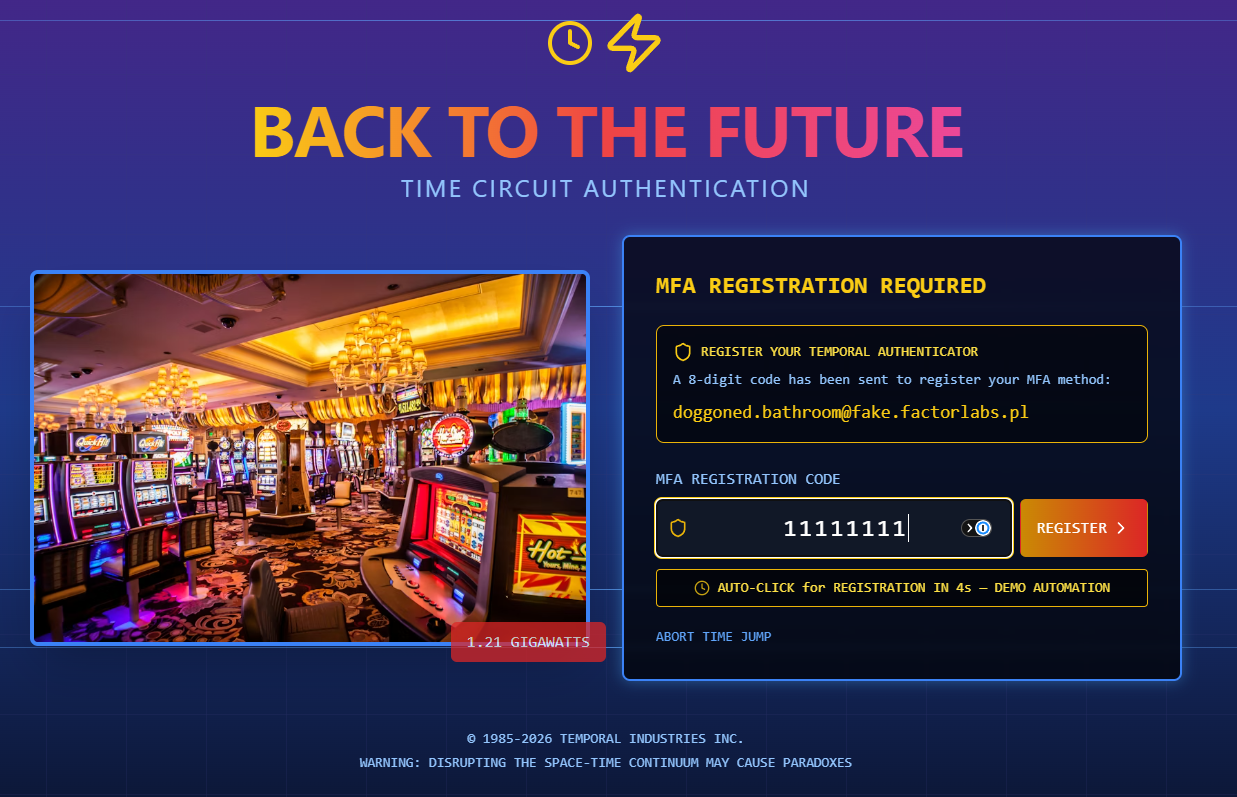
To provide a practical look at how smoothly Native Authentication can be integrated, I have created a detailed web example: https://native.factorlabs.pl/.
Implemented Features:
- Seamless Sign-Up and Sign-In flows with MFA (Email OTP).
- A custom Password Reset flow with an additional verification step (security code).
- User-friendly OTP auto-submission (not possible in the built-in User Flow).
Current Challenges and Limitations
- There is currently no way to trigger MFA during the initial Sign-Up flow; it can only be enforced upon the subsequent Sign-In attempt.
- When MFA is required and Account Recovery is part of the Sign-In flow, the user must provide an email OTP code twice: once to prove account ownership, and again to satisfy the MFA challenge. This feels redundant and could be streamlined to significantly improve the user experience. With Native Authentication, we currently have no control over the underlying MFA and Account Recovery workflows.
Expectations for Entra External ID Native Authentication
Hopefully, Microsoft will consider enhancing these flows by exposing new API capabilities—such as an mfa_already_verified flag—to allow for more flexible and user-friendly journeys in the future.