An AI coding agent spends its day in a terminal. It reads code, runs commands, and when it is done it waits quietly until I notice. Usually I notice ten minutes later, because I was in another window.
So I gave it a train.
agent-lego-duplo connects Claude Code to a LEGO DUPLO train over Bluetooth. I can ask “drive forward at 40 for five seconds, then blow the horn” and a toy locomotive rolls across my desk. The useful part is less playful:
- the train honks when Claude finishes or needs my permission,
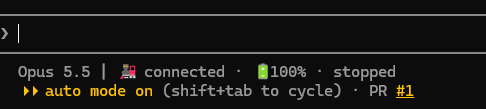
- the Claude Code status line shows the train state live:
🚂 connected · 🔋85% · ▶ 40%, - the light turns green or red for my unit tests and the CI pipeline of the current branch / PR.
💡Note: This is a playground, not a product. The train is the fun part. The real value is a tiny, real-hardware repo that touches every Claude Code extension point — MCP server, hooks, status line and slash commands — in a few hundred lines you can read in one sitting.
Why a train?
Business decision (from Paw Patrol Don't lose it, reuse it!) - I have a DUPLO train already, so why not make it useful for my development workflow?

So as a developer I want two things from an agent:
- Tell me when you need me. Not a toast notification I will miss — something I cannot ignore.
- Show me the state of the work at a glance: are the tests green? Is the pipeline for this PR done?
A build light is an old idea. A DUPLO train is a build light with a horn, a motor and a battery, and my kids already own one. The DUPLO Train Base (sets 10874, 10875, 10427, 10428, …) is a LEGO Powered Up hub: a motor, a speaker with built-in sounds, an RGB light and a battery level, all over Bluetooth Low Energy. node-poweredup already speaks the protocol in Node.js.
What was missing was the glue to Claude Code. That glue turned out to be small.
Easy integration: clone, install, claude
Everything is checked into the repo. There is no global config to edit and no daemon to start:
git clone https://github.com/mjendza/agent-lego-duplo.git
cd agent-lego-duplo
npm install
npm run check:ble   # Bluetooth state: poweredOn / OK
claude
Press the green button on the locomotive, wait for the status line to say connected, and you are done. Claude Code picks up three things from the project folder:
| File | What it does |
|---|---|
.mcp.json | registers the duplo-train MCP server (node src/server.js) |
.claude/settings.json | pre-approves the server and its tools, adds the hooks and the status line |
.claude/commands/*.md | /train-connect, /horn, /train-start, /train-stop, /train-status, /train-disconnect, plus /test-light and /ci-light for tests and pipelines |
The MCP registration is all of this:
{
  "mcpServers": {
    "duplo-train": {
      "type": "stdio",
      "command": "node",
      "args": ["src/server.js"],
      "env": { "DEBUG": "poweredup", "DUPLO_AUTOCONNECT": "60" }
    }
  }
}
DEBUG=poweredup sends the library’s Bluetooth logs to stderr (visible with claude --debug). DUPLO_AUTOCONNECT=60 starts a background Bluetooth scan as soon as Claude Code launches. It never blocks startup — if the train is not there, the status line simply says so.
💡Note: You do not pair the train in Windows. The library scans and connects directly. A train paired in Bluetooth & devices often refuses to connect — remove it there. Also close the LEGO DUPLO app on your phone: the hub accepts only one connection.
The four extension points
1. MCP server: the model gets tools
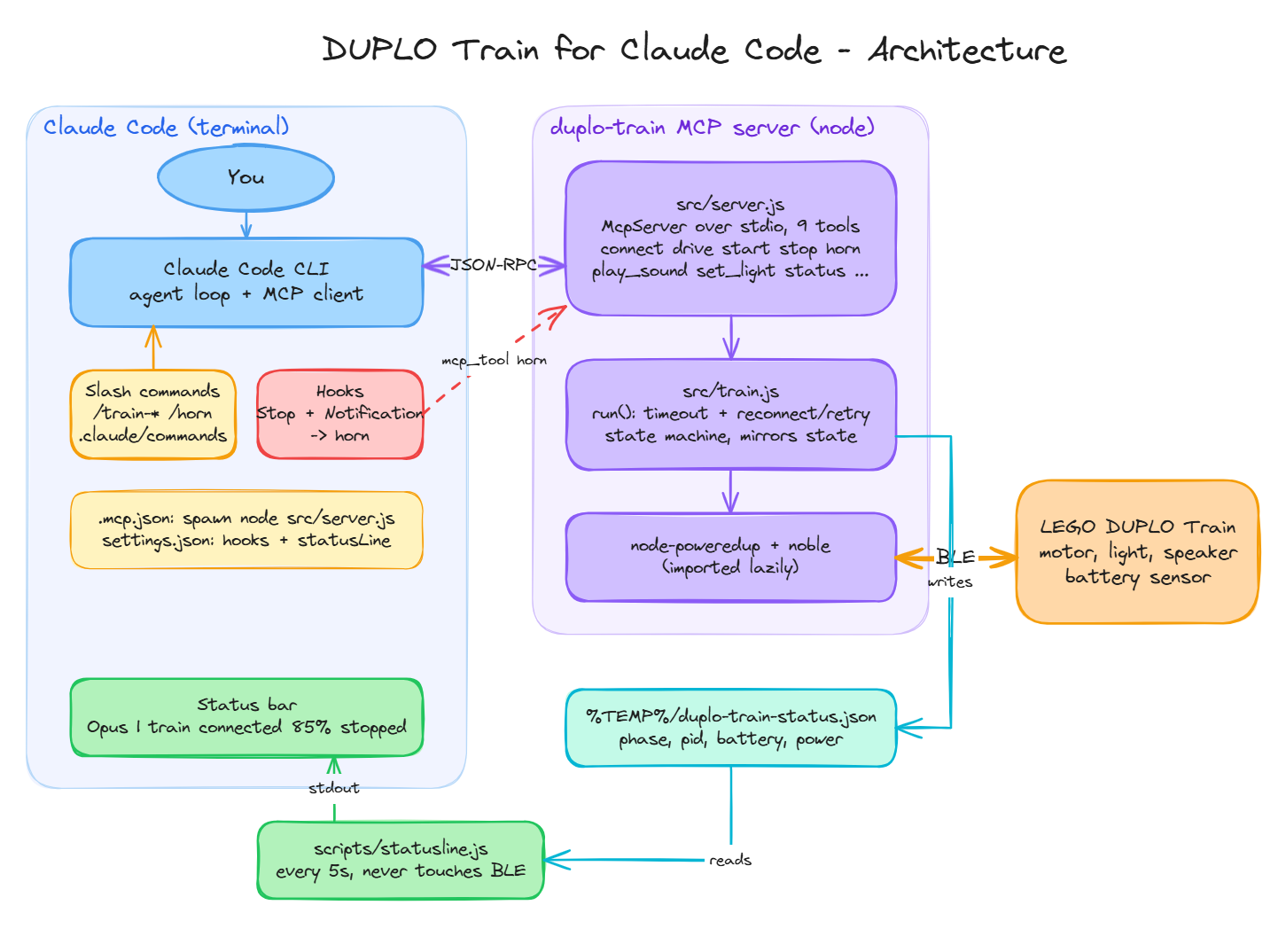
src/server.js is a stdio MCP server built with @modelcontextprotocol/sdk and zod. It exposes 9 tools: connect, disconnect, status, horn, play_sound, start, drive, stop and set_light. Each tool is a few lines:
server.registerTool("drive", {
  title: "Drive for N seconds",
  description: "Drive at a speed for a number of seconds (max 60), then brake.",
  inputSchema: {
    speed: z.number().min(0).max(100).default(50),
    direction: z.enum(["forward", "backward"]).default("forward"),
    seconds: z.number().min(0.5).max(60).describe("Duration in seconds"),
  },
}, wrap(({ speed = 50, direction = "forward", seconds }) => train.drive(speed, direction, seconds)));
Because the tools are just tools, natural language works out of the box:
“Connect to the train, blow the horn twice, drive forward at 40 for 5 seconds, then make the water refill sound and turn the light blue.”
2. Hooks: the train honks when Claude needs me
This is the feature I use every day. .claude/settings.json adds a Stop hook (Claude finished its turn) and a Notification hook (Claude is waiting for permission or input). Both call the MCP tool directly with the mcp_tool hook type:
"Stop": [{
  "hooks": [{
    "type": "mcp_tool",
    "server": "duplo-train",
    "tool": "horn",
    "input": { "onlyIfConnected": true },
    "timeout": 10
  }]
}]
Why not a shell-command hook? A shell hook starts a new process. That process cannot reuse the existing Bluetooth link, and it would fight the server for a hub that accepts only one client. Going through the MCP server reuses the live connection. With onlyIfConnected: true, a disconnected train costs nothing: no scan, no wait, and the agent never blocks on Bluetooth.
3. Status line: state at a glance
scripts/statusline.js is configured with refreshInterval: 5 and prints one line:
It never touches Bluetooth. The MCP server writes its state to %TEMP%\duplo-train-status.json (atomic write: temp file, then rename), and the status line only reads that file. It also checks whether the server’s pid is still alive, so a crashed server shows server offline instead of a stale connected. A file is the simplest IPC that can’t hang.
4. Slash commands: thin prompts
.claude/commands/horn.md is the whole command:
---
description: Sound the DUPLO train horn
allowed-tools: mcp__duplo-train__horn
---
Call the `mcp__duplo-train__horn` tool once (it auto-connects if needed).
Reply with one short line, e.g. "Toot toot!".
No logic, just a prompt that tells the model which tool to call. allowed-tools plus the pre-approval in settings.json means no permission prompt on every horn.
The developer feedback loop: tests and pipeline on the train
This is where the playground becomes a real tool. The MCP server gives Claude set_light, horn and play_sound. Claude already has a shell, a test runner and the GitHub CLI. Put them together in a slash command and the train becomes a build light, with no new code in the MCP server.
| Command | What it watches | Light |
|---|---|---|
/test-light [test command] | unit tests: npm test by default, or dotnet test, pytest, … | 🟡 running → 🟢 + departure sound / 🔴 + brake sound |
/ci-light | GitHub Actions for the current branch or PR (via gh) | 🟡 running → 🟢 + horn ×2 / 🔴 + brake sound |
Both are short Markdown prompts. You can read them in the repo, test-light.md and ci-light.md, and change them for your own stack.
My workflow: type /test-light, go back to the code, look at the desk. Yellow, then green. Or red and a brake sound, which somehow motivates me more than a red ✗ in a terminal. For CI: push, /ci-light, switch to something else. The train honks when the pipeline is done, and the light gives me the result before I look at the screen.
A few ideas from the implementation are worth reusing:
- The train is a display, never a gate. Train calls are best effort. If the train is off, you still get the test or pipeline result.
- Watch the right run.
/ci-lightusesgh pr checkswhen the branch has a PR, and otherwise picks the run for the commit you just pushed, not the previous (already green) run on the branch. - Make it automatic. Add one line to
CLAUDE.md, “After you run the test suite, set the train light GREEN if it passed and RED if it failed.”, and every test run Claude does shows up on the train. - Keep shell access scoped. Commands with
Bash(...)inallowed-toolsare pre-approved shell access, so the repo’s tests check that they only allownpm,gitandgh.
Use it from any repo, not just the train repo
Everything above is project-scoped: .mcp.json, .claude/settings.json and .claude/commands/ only load when Claude Code runs inside the train repo. That is perfect for playing, but my unit tests and pipelines live in other repos. To take the train with you, register it once for your user:
# from the train repo; use the absolute path of your clone
claude mcp add --transport stdio --scope user --env DUPLO_AUTOCONNECT=60 duplo-train -- node C:\dev\agent-lego-duplo\src\server.js
New-Item -ItemType Directory -Force $HOME\.claude\commands | Out-Null
Copy-Item .claude\commands\*.md $HOME\.claude\commands\
Then copy three blocks from the repo’s .claude/settings.json into ~/.claude/settings.json:
| Block | Change for user scope |
|---|---|
permissions.allow: ["mcp__duplo-train"] | none |
hooks (Stop + Notification → horn) | none — mcp_tool hooks address the server by name, duplo-train |
statusLine | absolute path: node C:\dev\agent-lego-duplo\scripts\statusline.js |
Now /test-light dotnet test in your API repo or /ci-light on your feature branch drives the same train. Adjust the Bash(...) entries in ~/.claude/commands/test-light.md to your test runner so it runs without a prompt.
💡Note: One train, one owner. Every Claude Code session starts its own MCP server, and the hub accepts one Bluetooth connection. The first session that connects owns the train. In the others the scan finds nothing and the hooks stay silent (
onlyIfConnected). All sessions share one state file, so the status line shows whichever server wrote last. Close the owning session, press the green button, and run/train-connectwhere you need it.
Build your own
The main lesson is not about trains: building your own status line, MCP server or slash command for an agent is easy. Take a tool or library you already use, whether it drives a device, calls an API or runs a CLI, wrap it in a few MCP tools, and your agent can use it. The design decisions for this one are in ADR 0001.
A playground you can test without the toy
What I like most as a developer: you don’t need the train to work on the code.
npm testruns hardware-free tests that spawn the MCP server over stdio, check its tools and validate the config files. GitHub Actions runs them on Ubuntu and Windows.npm run inspectoropens the MCP Inspector, so you can call the tools from a browser.npm run smokeis the manual hardware test: connect, horn, green light, drive 2 s, brake, disconnect.
And the pattern is not about LEGO. Swap train.js for a USB lamp, a smart bulb, a Stream Deck or an LED strip behind your monitor. One long-lived MCP server owns the device, hooks reuse it, a state file feeds the status line, and slash commands wire it to your tests and your pipeline.
What next: talk to the agent over VoIP
The train honks, but it can’t listen. My next step is voice over IP. A desk phone like this one could call the agent, or be called by it.
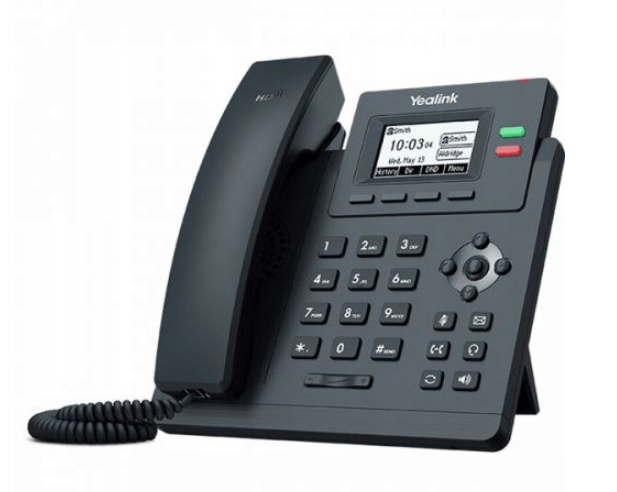
The idea uses the same building blocks as the train:
- an MCP server that owns the SIP connection, the way
duplo-trainowns the Bluetooth link, - a
Notificationhook that rings the phone when Claude needs permission, instead of honking, - speech-to-text and text-to-speech, so I can pick up the handset, hear what Claude is asking and answer “yes, go ahead”,
- the phone display as another status line, showing the test or pipeline result.
Same pattern, a different device: one long-lived MCP server, hooks that reuse it, and the agent can reach me even when I’m away from my desk.
Summary
With one MCP server, two hooks, a status line and a few slash commands, my coding agent:
- honks when it finishes or needs my permission,
- shows the train state in the status line,
- turns the light green or red for unit tests (
/test-light) and for the CI pipeline of the current branch or PR (/ci-light).
Setup is git clone, npm install, claude. One claude mcp add --scope user later it follows you to every repo. Clone the repo, borrow a train from your kids, and build your own playground - then tell me what your agent drives.